
 Guides
How to Fund Your DeCard with Stablecoins in Minutes
Learn how to fund your DeCard with stablecoins, how to choose the right network, and how to avoid common mistakes.
DeCard lets you spend your stablecoins at millions of merchants worldwide, but before you can start using your card, you'll need to fund it first.
The good news? Funding your DeCard only takes a few minutes. What’s even better? Choosing the right network can save you significant time and fees.
You can fund your DeCard with USDT or USDC through several blockchain networks, including Polygon, Ethereum, Solana, Tron, and Base — with more networks on the way to give you greater flexibility. Each network processes transfers differently, with varying fees and confirmation times.
How Blockchain Transfers Work
If you're used to traditional banking, blockchain transfers follow a similar concept: instead of moving money between bank accounts, you're transferring stablecoins from one wallet address to another.
The key difference is speed and efficiency. Traditional bank transfers, especially international ones, can take hours or even days because they require confirmation from multiple intermediaries. On the other hand, blockchain transfers are processed directly on the network, often settling in seconds or minutes, regardless of where you or the recipient are located.
When you send stablecoins, the transaction is verified and recorded on a blockchain network such as Polygon, Ethereum, or Solana. Each network operates independently, with its own validators that confirm transactions and maintain a shared ledger, making transfers secure, transparent, and verifiable.
What are gas fees?
Every blockchain transfer requires a small processing fee, commonly called a "gas fee." This fee compensates the validators who process and confirm your transaction. Gas fees vary depending on the network you use and how busy it is at the time — during periods of high demand, fees may increase as users compete to have their transactions processed faster. For a detailed walkthrough, read our article explaining what are gas fees.
This is why choosing the right network matters: some networks consistently offer lower fees and faster confirmations than others.
Supported Networks for Funding your DeCard
DeCard supports multiple blockchain networks, giving you flexibility based on where your stablecoins are held:
USDC: Polygon, Solana, Base, Ethereum
USDT: Polygon, Solana, Tron, Ethereum
Each network has different transaction fees and confirmation times. Although Polygon originated as a Layer 2 scaling solution for Ethereum, it has grown into a leading blockchain platform for global payments. With low fees, rapid settlement, strong security, and increasing enterprise and fintech adoption, Polygon is emerging as a go-to network for scalable, cross-border digital transactions.
For USDC, DeCard users also enjoy a 1:1 conversion rate — every 1 USDC becomes 1 USD spending power with zero conversion fees, so you can start spending instantly.*
*This applies to the DeCard USD card only (learn more about card types here) and is available until 31 March 2026.
How to Fund your DeCard
Step 1: Open the DeCard app and navigate to D-Vault → Pay to card.
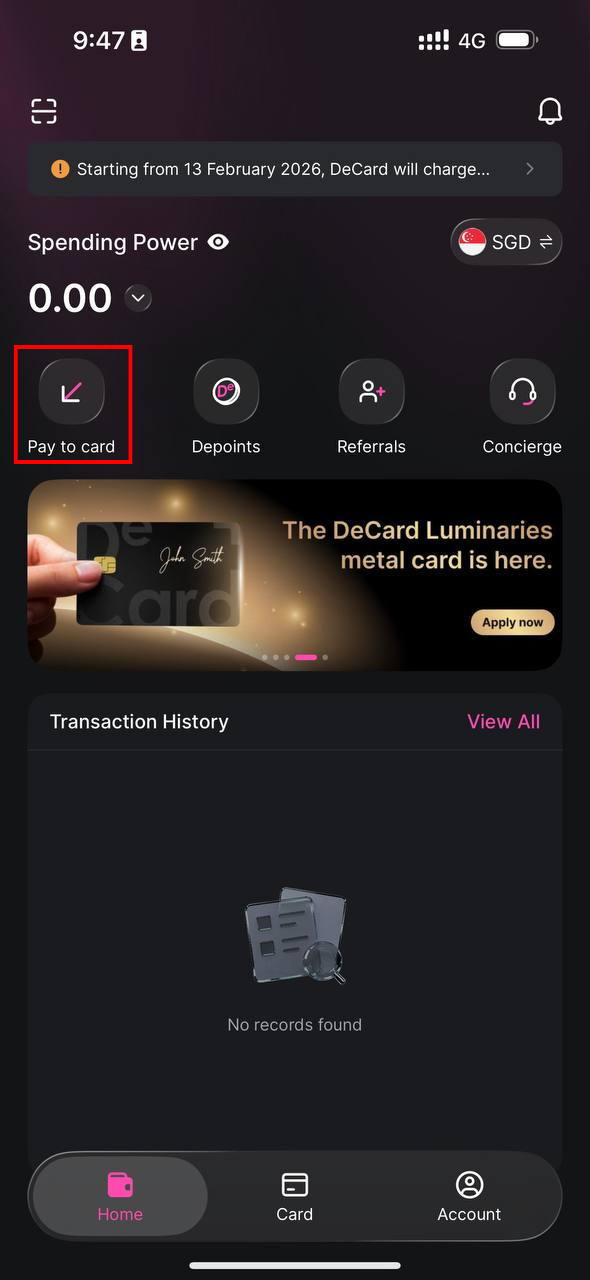
Step 2: Select your stablecoin — either USDC or USDT.
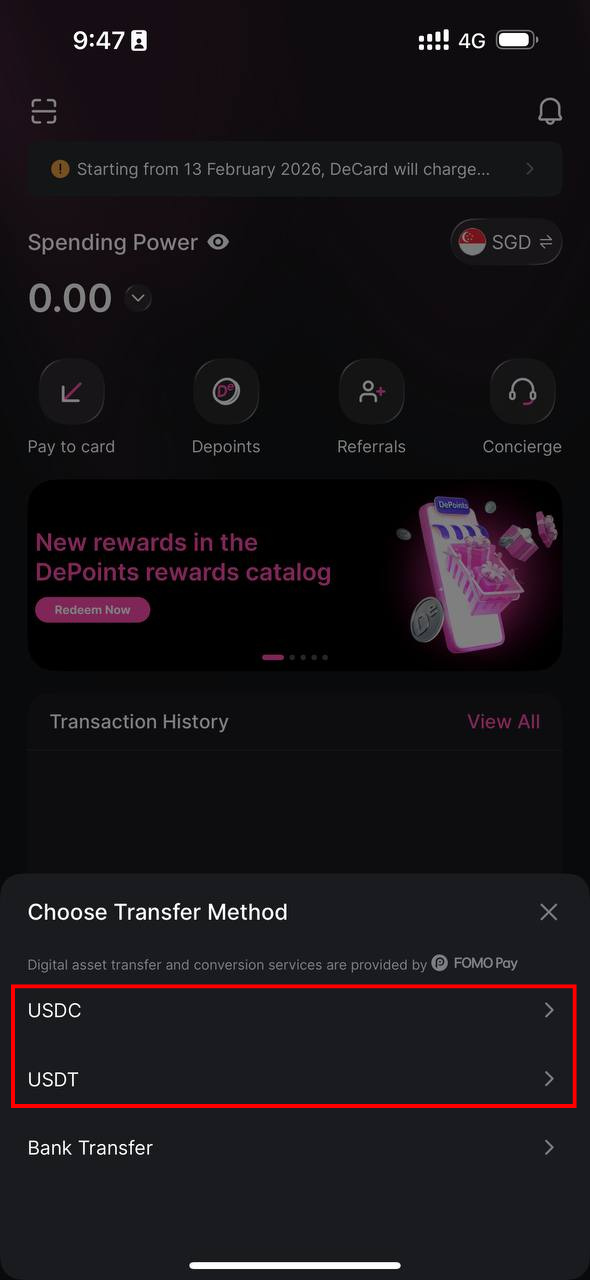
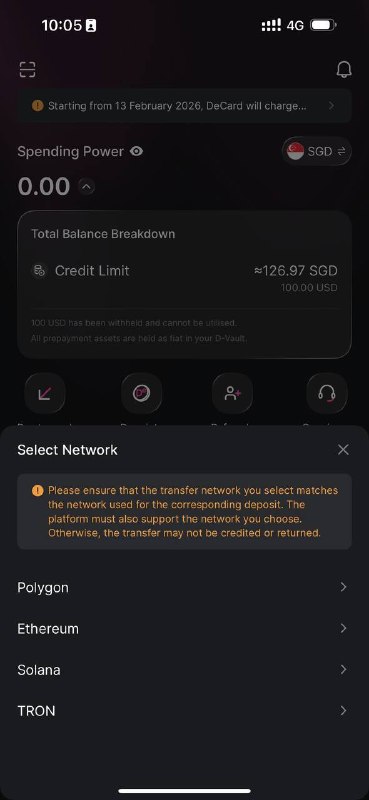
Step 3: Choose your blockchain network.
For USDC, you can transfer via Polygon, Solana, Base, and Ethereum.
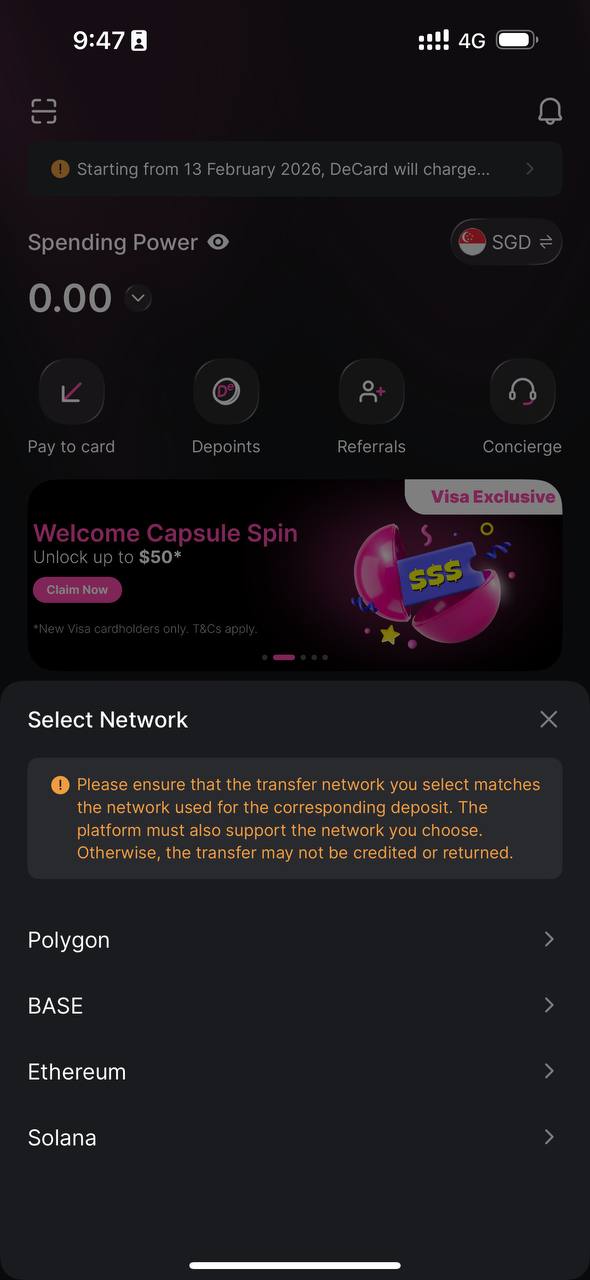
For USDT, you can transfer in via Polygon, Solana, Tron, and Ethereum.
Step 4: Copy the unique address provided.
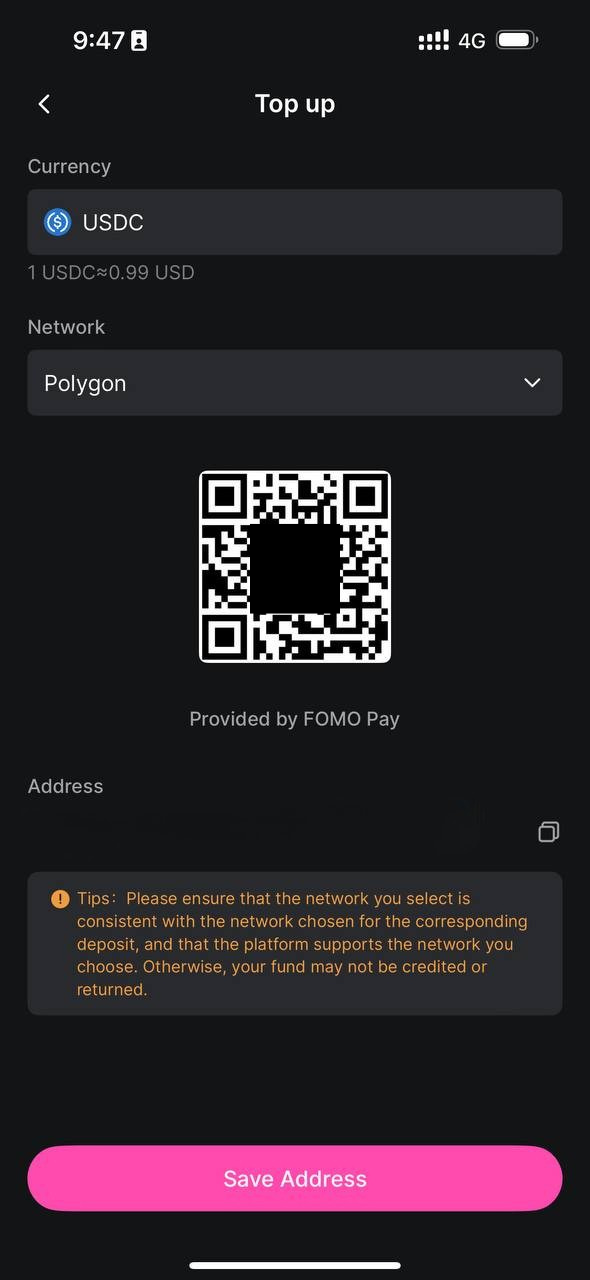
This address is specific to your DeCard, so please double-check it before proceeding.
Step 5: Open your external wallet or exchange and send your stablecoins.
Ensure that the network you select in your wallet matches the one you chose in the DeCard app. Once the transaction is confirmed on-chain, your DeCard balance will update automatically.
Common Mistakes to Avoid
Sending on the wrong network
If you select Polygon in the DeCard app but send via Ethereum from your wallet, your funds may be lost. Always double-check that the networks match.
Copying the wrong address
Make sure you copy the full address. Partial addresses will result in failed or lost transactions.
Forgetting network fees
Your wallet will deduct a small gas fee from your balance, depending on the network you have selected. Ensure that you have enough to cover both the transfer amount and the fee.
Sending unsupported digital assets
Currently, only USDC and USDT are accepted for DeCard. Other digital assets sent cannot be recovered.
Tip: If you're funding your DeCard for the first time, consider sending a small test amount first to confirm everything works correctly.
Why Polygon is the Best Network for Funding
While all supported networks work, Polygon stands out as the most reputable and efficient choice for funding your DeCard.
Lower fees
Polygon transaction fees are typically under $0.01, compared to Ethereum which can range from $0.12 to several dollars depending on network congestion.
Faster confirmations
Under optimal conditions, Polygon's average transaction confirmation time is around 2 seconds, compared to Ethereum's 12 seconds. During peak usage, both networks may experience slight delays, but Polygon's infrastructure is designed to handle high transaction volumes efficiently, without delay.
Widely supported
Most major wallets and exchanges support, and integrate with, Polygon, so you likely already have access without needing to set up anything new.
Reliable and established
Polygon is one of the most widely used Layer 2 networks, with over 5.3B total transactions processed and 99% uptime over 5 years.
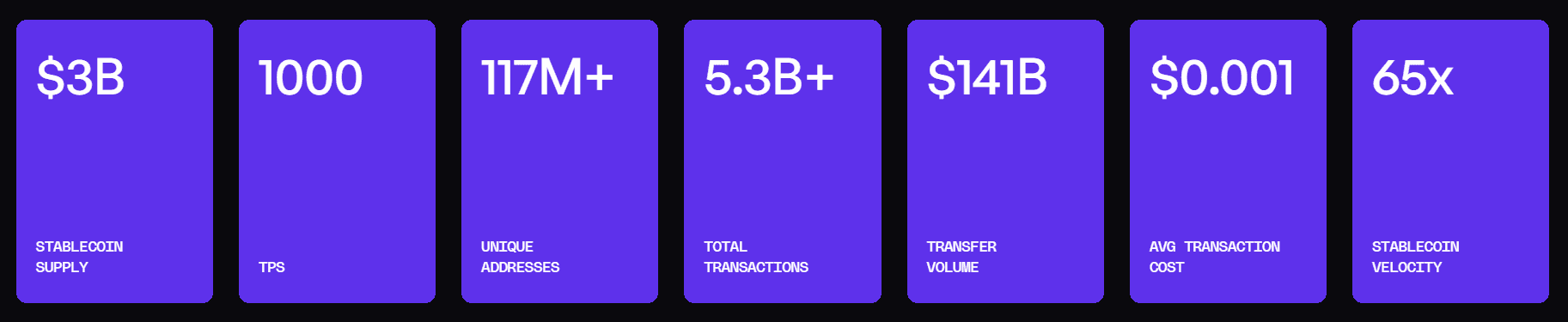
For most users, Polygon offers the best combination of speed, cost, and reliability when funding your DeCard.
Ready to put your stablecoins to use? Fund your DeCard today!